 English
 Français
 Español
 Deutsch
 Italiano
 العربية



Tel :+86-755-86961139
Email :sales@vivo-light.com
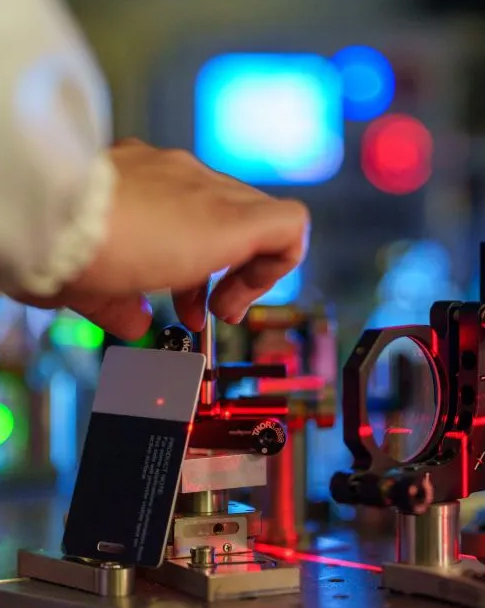

You may feel nervous when searching for a vein during a medical procedure. Many people experience discomfort because first attempts often fail—rates range from 10.5% to 60% in clinical settings. A projection vein finder helps you locate veins quickly, which increases first-attempt success and reduces pain. Patients report shorter crying durations and less anxiety. In healthcare, using a vein finder means you provide safer, faster care and improve patient satisfaction.
First-attempt venipuncture failure rates:
34.83% in one study
36% in Bhutan
55% in the Netherlands
40% in the South-eastern United States
Projection vein finders increase first-attempt success rates, reducing patient discomfort and anxiety during procedures.
Proper device preparation, including cleaning and calibration, ensures accurate vein visualization and enhances procedure efficiency.
Using a vein finder helps beginners gain confidence, improve skills, and provide better patient care by clearly showing vein locations.
Choose a vein finder with high image clarity and portability to enhance workflow and adapt to various patient needs.
Regular practice and training with vein finders lead to improved accuracy and patient satisfaction in medical procedures.
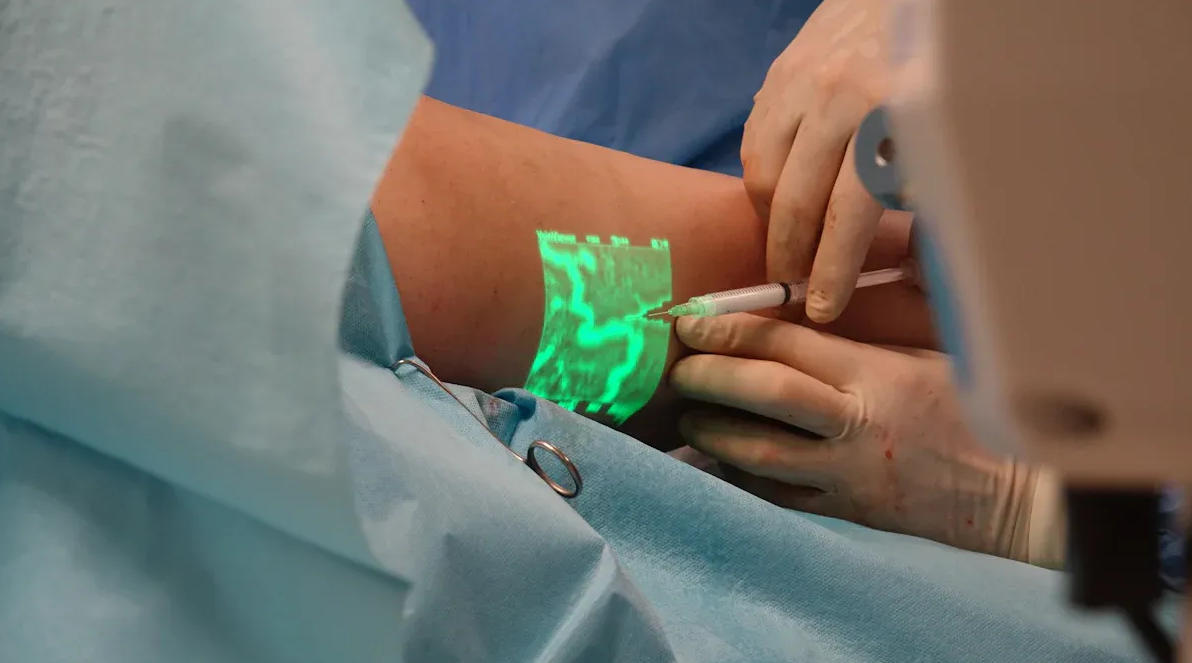
A projection vein finder is a medical device that helps you locate veins beneath the skin. You use this tool to make intravenous access easier, especially when veins are hard to find. In medical literature, vein finder devices are specialized tools designed for identifying veins, which is especially helpful for procedures involving children or patients with difficult-to-locate veins. The device uses advanced technology, such as near-infrared light, to enhance vein visualization. When you turn on a projection vein finder, it shines light onto the skin. The deoxygenated blood in veins absorbs the red light, making veins appear as dark lines. This process, called transillumination, gives you a clear view of the veins and helps you choose the best spot for needle insertion.
You will find projection vein finders useful in many healthcare settings. They help you with tasks like drawing blood samples, administering medications, providing long-term IV feeding, conducting chemotherapy, performing hemodialysis, and executing blood transfusions. The device improves efficiency by reducing the time spent searching for veins. You can complete procedures faster and with fewer needle attempts, which means less discomfort for your patients.
Tip: Using a projection vein finder can make your work smoother and help your patients feel more at ease during medical procedures.
If you are new to medical procedures, finding a vein can be challenging. You may worry about missing the vein or causing pain. A vein finder gives you confidence by showing you exactly where the vein is located. You can avoid multiple needle pokes, which reduces anxiety for both you and your patient. Beginners benefit from using a vein viewer machine because it provides a clear image, making it easier to perform tasks like IV insertion or blood draws. You will also improve your skills faster and deliver better care in healthcare environments.
A vein finder is not just a tool—it is a support system for anyone learning medical techniques. You can rely on it to guide you through procedures and help you achieve successful outcomes.
You use vein finder technology to make veins visible beneath the skin. Most devices rely on near-infrared light, which interacts with hemoglobin in your blood. This process creates a clear map of veins by projecting an image onto the skin. The device detects the absorbance difference between veins and surrounding tissue. Hemoglobin absorbs infrared light, so veins appear darker than the tissue around them. You see a real-time image that helps you locate the best spot for venipuncture.
Here is a table showing common technologies used in projection vein finders:
|
Technology |
Description |
|---|---|
|
Infrared Light Technology |
Key component for visualizing veins, enhancing clinical efficiency by projecting a clear map. |
|
Accurate Vein Detection |
Improves patient comfort and supports precise venipuncture. |
|
Enhanced Efficiency |
Reduces failed attempts during venipuncture. |
|
Near-Infrared Laser Technology |
Allows for crisp image processing and quick scanning, accommodating patient movement. |
Near-infrared vein finder technology improves visibility by reflecting light and creating a vein map. You see this map on a screen or directly on the patient's skin. The non-invasive approach means you do not need to touch the skin to find a vein, which increases comfort and safety.
You gain several benefits when you use projection vein finders. The technology increases your success rate for first vein puncture attempts. You work faster and with greater accuracy, which improves patient satisfaction and reduces medical disputes.
Tip: Using vein finder technology can help you avoid multiple needle sticks and make procedures smoother for everyone.
Here are some key benefits for users:
Accurate vein visualization reduces unsuccessful venipuncture attempts.
Non-invasive approach minimizes patient anxiety and discomfort.
Improved efficiency saves time and enhances precision in procedures.
Enhanced patient experience by reducing the number of needle sticks.
Increased safety by avoiding accidental punctures.
You can see the impact in the table below:
|
Benefit |
Statistic |
|---|---|
|
Reduction in first venipuncture failure rates |
77.5% |
|
Decrease in infiltration rate |
61.4% |
You also benefit from compact and portable designs, which suit many medical environments. Vein finder technology makes your workflow more efficient and helps you deliver better care.
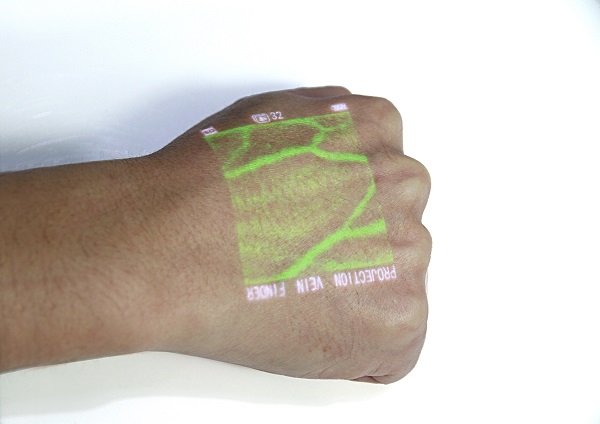
You need to prepare your device before you start any procedures. Proper preparation ensures clear images and accurate vein visualization. Follow these steps for best results:
Clean your projection vein finder with a disinfectant wipe. This removes any residue and helps you get a clear image.
Calibrate the device according to the manufacturer’s instructions. Regular calibration keeps your device accurate and reliable.
Check the battery level. A fully charged device prevents interruptions during procedures.
Adjust the room lighting. Dim bright lights or reduce glare to improve visibility of veins.
Tip: Always keep your device clean and charged. This simple habit increases the ease and reliability of your procedures.
Correct patient positioning makes vein visualization and cannulation easier. You want your patient to feel comfortable and relaxed. Here are some practical tips:
Ask your patient to remove bulky clothing and jewelry from the area you plan to use.
Position the patient’s arm below heart level. This increases blood flow and makes veins more visible.
Support the arm with a pillow or cushion. This prevents movement during insertion.
Make sure the area is exposed and well lit. Good lighting helps you see hard-to-find veins.
Note: Patient comfort leads to better cooperation and smoother procedures.
You can follow these step-by-step instructions to use a vein finder for procedures like blood draw, iv catheter insertion, or peripheral intravenous placement:
Talk to your patient. Explain the procedure and answer any questions. This reduces anxiety and builds trust.
Gather all supplies for cannulation and insertion. Prepare gloves, alcohol swabs, and your device.
Position and expose the area. Make sure the arm is comfortable and visible.
Apply a tourniquet above the intended site. This enhances vein visibility and makes cannulation easier.
Turn on your vein finder. Hold the device above the skin and adjust it until you see a clear image of the vein.
Identify and mark the best vein for insertion. Choose a vein that is straight and easy to access.
Cleanse the area with an alcohol swab. This prevents infection during venipuncture or iv catheter insertion.
Proceed with standard venipuncture, blood draw, or cannulation. Insert the needle at the marked site.
After the procedure, clean your device and store it properly.
Callout: Always follow these steps for every procedure. Consistency improves your success rate and patient satisfaction.
You may encounter issues during procedures. The following table lists common problems and solutions to help you use your device effectively:
|
Common Issue |
Resolution |
|---|---|
|
Invisible veins |
Use transillumination to make veins hidden by adipose tissue, dark skin, edema, or dehydration visible. |
|
Rolling veins |
Apply gentle pressure to stabilize veins during insertion and prevent lateral movement. |
If you cannot see a vein, reposition the device or adjust the lighting. For rolling veins, use gentle pressure to keep the vein steady during insertion. Always stay calm and reassure your patient if you need to repeat any steps.
Tip: Troubleshooting helps you adapt quickly and maintain ease during procedures.
You can master the use of a vein visualization device with practice and patience. Each procedure builds your confidence and skill. You will find that using a vein finder makes cannulation, blood draw, and iv catheter insertion easier, even with hard-to-find veins. Your patients will appreciate your care and expertise.
You must always prioritize patient safety when using a vein finder. Before each procedure, check that your device is certified for medical use and that the light source energy stays within the safe range for non-ionizing radiation. This protects both you and your patient from unnecessary risks. The table below highlights important safety guidelines:
|
Safety Guideline |
Description |
|---|---|
|
Patient Adaptability and Safety |
The equipment must serve a wide range of patient groups and be absolutely safe. |
|
Safety Level |
Confirm the light source energy is within the safe range and the device is certified. |
You should also make sure the device adapts to different patients, including children and older adults. Always follow the manufacturer’s instructions for operation and storage.
Tip: Patient safety starts with proper device checks and following all recommended guidelines.
A vein finder helps you achieve higher success rates during venipuncture. You can locate veins quickly, which means fewer failed attempts and less discomfort for your patient. This technology also lowers the risk of bruising or hematomas by guiding accurate needle placement. Here are some key benefits:
Reduced failed attempts lead to less pain for your patient.
You work more efficiently and complete procedures faster.
Accurate placement lowers the risk of complications.
Higher first-attempt success rates improve the patient experience.
Vein visualization technology can reduce needle pokes by up to 52%.
You support patient safety every time you use a vein finder to minimize needle sticks.
Proper cleaning and maintenance keep your vein finder reliable and safe for every procedure. After each use, wipe the exterior with a soft cloth and a mild disinfectant. Store the device in a clean, dry place. You should also:
Establish an equipment file to record monthly cleaning, battery health, and any drops.
Use the original charger and avoid letting the battery fully discharge.
Regularly inspect the power cord for any damage.
Note: Consistent cleaning and careful maintenance extend the life of your device and protect patient safety.
Selecting the best projection vein finder for your needs requires careful consideration of several features. You want a device that delivers clear images, adapts to different patients, and fits your workflow. The following guide helps you compare vein finder technology and choose the right device for your healthcare applications.
Image clarity plays a vital role in the accuracy of vein location. High-definition images allow you to see veins and surrounding tissues with greater detail. This reduces the chance of missing a vein and improves your confidence during procedures. Devices that offer precise segmentation minimize back-projection error, which means you match veins more accurately.
|
Aspect |
Description |
|---|---|
|
Image Clarity |
High-definition images enhance visibility of veins and surrounding tissues. |
|
Segmentation Accuracy |
Influences the back-projection error, affecting vein matching accuracy. |
|
Back-Projection Error |
Reflects the accuracy of vein matching; larger errors indicate lower accuracy. |
You should look for vein finder features that include real-time image processing and high-resolution displays. These features help you locate veins quickly and reduce the risk of errors. Devices that use near-infrared light project clear images onto the skin, making vein location easier for all skill levels.
Tip: Choose a device with high image clarity to improve the accuracy of every procedure.
Projection vein finders use different technologies to visualize veins. Understanding these options helps you select the best device for your applications.
|
Technology Type |
Description |
|---|---|
|
Near-Infrared (NIR) |
Uses near-infrared light to penetrate the skin and reflect off hemoglobin, creating a high-contrast image. |
|
LED Transillumination |
Employs visible red or orange light to shine through the skin, making veins appear as dark lines. |
You can find vein finder technology that projects veins onto the skin or displays them on a screen. Some devices use a wand connected to a tablet for detailed images. Others use LED lights and pressure to illuminate veins, which is useful for quick procedures. The principle behind these devices is that hemoglobin absorbs light differently than other tissues, allowing you to see veins clearly.
Note: Consider the technology type that best fits your clinical applications and patient needs.
Portability is a key feature for busy healthcare environments. You need a device that is lightweight and easy to carry. Many projection vein finders weigh less than 0.3 kg, making them ideal for fast-paced settings. Ergonomic designs allow you to move quickly between patients and respond to emergencies.
Portable devices fit in your hand or pocket.
Lightweight models help you work efficiently in crowded spaces.
Sleep mode conserves battery life when the device is not in use.
A portable vein finder improves workflow and enhances patient care. Sleep mode ensures your device is ready whenever you need it, reducing downtime.
Tip: Select a portable device with sleep mode to maximize efficiency in your healthcare setting.
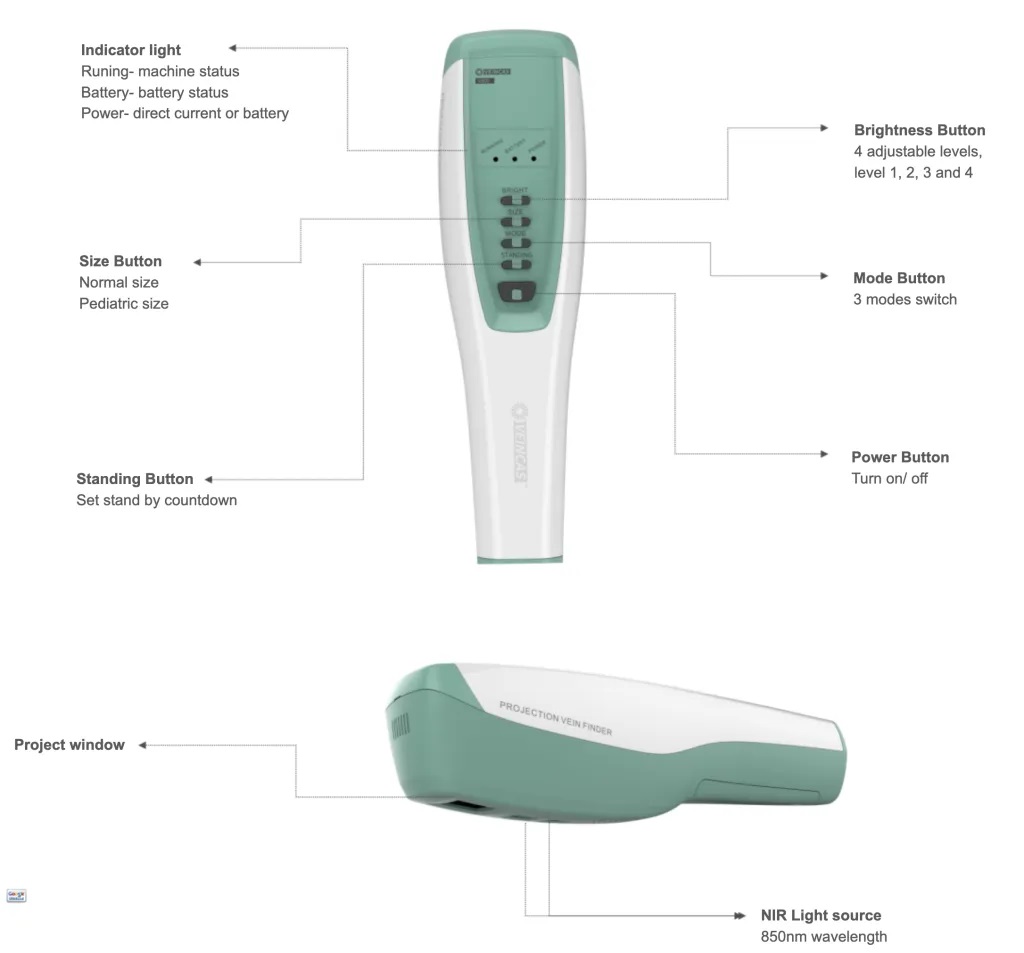
Charging convenience matters when you use a vein finder frequently. Devices with universal charging ports allow you to recharge easily, even in different locations. You avoid searching for special chargers and keep your device ready for use.
Universal ports support standard cables.
Easy charging reduces interruptions during procedures.
Reliable power supply ensures consistent performance.
You should check for vein finder features that include universal charging options. This makes your device more adaptable and reduces maintenance concerns.
A projection vein finder must work well for all patient groups. You encounter patients with difficult venous access, such as children or those with obesity. Devices that visualize veins up to 10 mm deep provide more access sites and improve first-attempt success rates.
Devices designed for pediatric use reduce stick attempts and increase satisfaction.
Visualization of deeper veins helps with challenging cases.
Features for patient assessment support a wide range of healthcare applications.
You improve outcomes by choosing a device that adapts to various patient needs. This flexibility is essential for medical professionals working in diverse environments.
Callout: Look for vein finder technology that supports pediatric and adult patients for broader applications.
Price is an important factor when selecting a projection vein finder. Devices range from about $64.99 to several thousand dollars. The cost depends on features, performance, resolution, ease of use, and device longevity.
Advanced features and high resolution increase the price.
Reliable devices with longer lifespans offer better value.
Consider your budget and the specific applications of a vein finder in your practice.
You should compare devices based on the features you need and the price you can afford. Investing in a quality device improves accuracy and patient care over time.
|
Price Factor |
Influence on Cost |
|---|---|
|
Features |
More features raise the price |
|
Performance |
Reliable performance increases value |
|
Resolution |
Higher resolution costs more |
|
Ease of Use |
User-friendly devices may cost extra |
|
Longevity |
Durable devices offer long-term savings |
Tip: Balance your budget with the essential features for your clinical applications.
When you compare projection vein finders, focus on the features that matter most for your workflow and patient population.
Test image clarity and accuracy in real-world conditions.
Check the technology type and its suitability for your applications.
Evaluate portability and battery life for your clinical setting.
Confirm the presence of universal charging ports.
Assess the device’s adaptability for different patients.
Compare prices and consider long-term value.
You make a better choice by prioritizing the features that support your daily practice and improve patient outcomes.
Emoji: Remember, the right vein finder technology helps you deliver safer, faster, and more comfortable care.
You can build confidence with projection vein finders by starting with proper training. Many resources help you learn the basics and master device operation. Training videos guide you through essential steps, showing you how to use the device safely and effectively. You may find skills quizzes useful if you want to test your knowledge and earn a certificate of completion. Some guides also include assembly instructions for specialized stands, which make setup easier.
Training video tutorials explain device operation step by step.
Skills quizzes help you check your understanding and track progress.
Assembly guides show you how to set up stands for vein-finding devices.
Practice makes a big difference. You should try using the device on simulation arms or with colleagues before working with patients. This helps you get comfortable with positioning, image adjustment, and vein selection. You will notice your accuracy improves with each attempt.
Tip: Set aside time for hands-on practice. Repetition helps you develop skill and speed.
You may face challenges when using a projection vein finder for the first time. Common issues include difficulty locating suitable veins, time pressure during procedures, and patient anxiety from previous painful experiences. If you struggle to find a vein or feel unsure about device settings, ask a more experienced colleague for guidance. You can also reach out to your supervisor or clinical educator for support.
Difficulty finding veins can happen with certain patients.
Time constraints may increase stress during venipuncture.
Patient anxiety can affect cooperation and comfort.
If you encounter repeated problems, do not hesitate to seek help. You can join group training sessions or ask for feedback after procedures. Support from your team helps you learn faster and ensures patient safety.
Note: Asking for help shows your commitment to learning and improving care.
You can select the best projection vein finder by focusing on image quality, ease of use, price, maintenance, and suitability for different skin tones.
|
Key Consideration |
Description |
|---|---|
|
Image Quality and Accuracy |
Clear images help you quickly locate a vein. |
|
Ease of Use and Portability |
Lightweight devices with simple controls improve workflow. |
|
Price, Value, and Affordability |
Balance cost with essential features and safety certifications. |
|
Maintenance and Durability |
Easy cleaning and strong warranty support reliability. |
|
Suitability for Different Skin Tones |
Devices should work well for all patients. |
Regular practice with a vein finder improves your skills and leads to better patient outcomes. You should always prioritize safety, provide training, and maintain infection control. Mastering this technology helps you deliver faster, more comfortable care and boosts patient confidence.
You see veins more clearly with a projection vein finder. The device uses light to highlight veins under the skin. This makes it easier to find veins in patients with dark skin, obesity, or dehydration.
Yes, you can use a pediatric vein finder on children. The device helps you locate small or hard-to-find veins. This reduces pain and anxiety for young patients.
You do not need advanced training. Most devices come with simple instructions. You can learn basic operation through practice and short tutorials.
You should wipe the device with a soft cloth and a mild disinfectant after each use. Avoid harsh chemicals. Store the device in a clean, dry place.
Try adjusting the room lighting or repositioning the device. You can also ask the patient to lower their arm below heart level. If you still cannot see a vein, seek help from a colleague.
Leave A Message
Scan to WhatsApp :


 IPv6 network supported